You saved the source. Finding it three months later is the problem.
Research sessions produce dozens of tabs - papers, datasets, sources, references. Clibben organizes them automatically and finds any of them in seconds, from whatever you are currently working in.
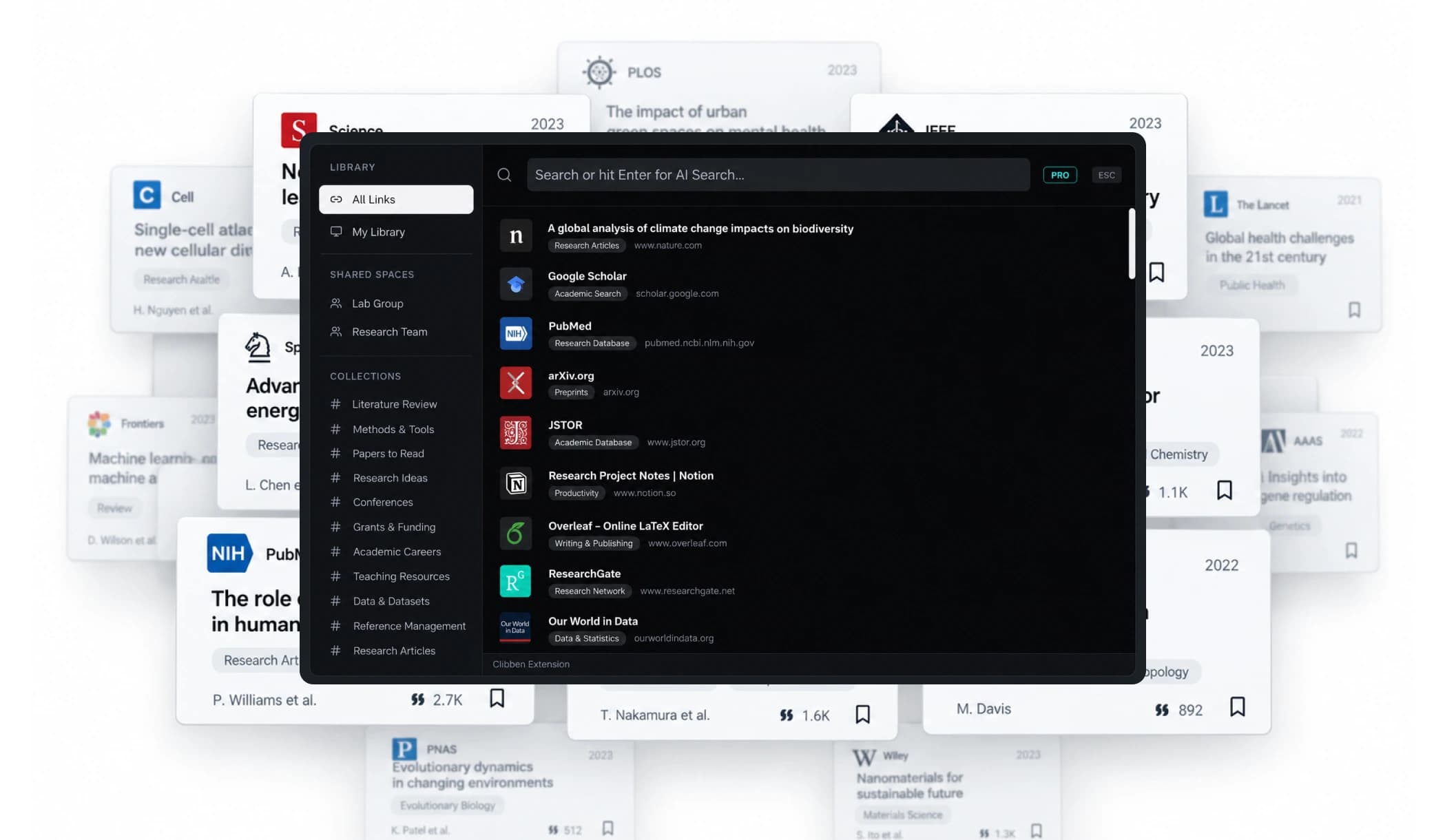
Research is not a single session. Your link system should not be either.
Most bookmark tools are designed for the same-day retrieval problem: save something, find it an hour later. For casual browsing this is fine. For research it is not.
Research happens across months. You save a paper during a literature review and need it again when you are writing the discussion section six weeks later. You find a dataset in February and need to cite its methodology in April. You annotate a source in one project and realise it is relevant to a different paper you are starting now.
The tools researchers typically reach for - browser bookmarks, Notion databases, Zotero for papers, starred tabs - each solve part of this. Browser bookmarks are title-only and unsearchable at scale. Notion is powerful but requires manual organization that most people abandon by week two. Zotero is excellent for academic citations but does not handle the full range of what researchers save - blog posts, datasets, preprint servers, methodology explainers, non-academic sources.
The gap is in the middle: a tool that saves anything, organizes it automatically, and makes it findable weeks later by what it was about - not just what it was called.
“Most people do not really have a research system. They have a saving habit. The failure is not in saving - it is in retrieving.”
Designed for ephemeral tab parking. Relies on exact page titles. When your library exceeds 100 links, title recall collapses and tabs stay open out of fear.
Understands what a page is about - not just its title. Retrieves by meaning months later.
A researcher's saved links span six different categories. Most tools handle one.
The academic paper is the obvious one. Here is what actually accumulates across a research project.
Academic Papers & Preprints
ArXiv preprints, PubMed abstracts, JSTOR articles, ResearchGate papers, and institutional repository PDFs. You save them mid-reading with the intention of citing them. Three months later the tab is gone, the citation is needed, and you are Googling the author's name hoping to find it again.
Datasets & Data Sources
Government open data portals, WHO and World Bank indicator pages, Harvard Dataverse / Zenodo repositories, and methodology documentation. These URLs are long, unmemorable, and often buried several clicks inside a data portal. The only way back is navigating the portal from scratch - or having saved it properly the first time.
Methodology References
Explainers for statistical methods, research protocols, tutorials for analytical software, documentation for analysis pipelines, and methodological discussions. Saved mid-problem, needed again when someone asks "how did you do this?" in peer review.
Non-Academic Sources
News articles used as contemporary context, policy documents, organisation reports, grey literature, blog posts from practitioners. These sit outside citation managers like Zotero. They are saved to browser bookmarks, forgotten, and re-found by accident when they are needed.
Tools & Software
Online analysis tools, survey platforms, transcription services, reference managers, data visualisation libraries, browser extensions for research. Saved once when discovered, needed again when starting a new project that requires the same setup.
Cross-Project References
Sources that were saved for one project but are relevant to another. This is the category that falls through every system - because most tools organise by project, not by topic, and sources that span projects end up saved twice or not found at all.
Three moments in a research project where Clibben changes how you work
Not a general productivity pitch. Three specific situations researchers face every single week.
Save papers at the speed of scanning. End with an organized library instead of 40 open tabs.
You are scanning papers, scanning preprint servers, reading methodology sections. Links accumulate fast. Instead of leaving tabs open or dumping URLs into a Notion database that will go stale, you press your hotkey on each relevant page. Clibben reads the page and places it into a collection - “Methodology References”, “Longitudinal Studies”, “Dataset Sources” - automatically. Your literature review session ends with an organized, searchable library instead of 40 open tabs.
Retrieve sources from inside your manuscript without losing your cognitive thread.
You are drafting in your browser - Google Docs, Overleaf, or any web-based editor. You need a source you saved three months ago. You remember what it was about but not the title or URL. Press your keyboard shortcut. The Clibben overlay appears on top of your document. Type what you remember: “longitudinal memory consolidation” or “sampling methodology critique.” The source appears. You click it. The overlay closes. You never left your document. Your writing flow is unbroken.
This is the moment that matters most. Every context switch out of a writing session has a real cognitive cost. The research is still in working memory. Losing it to open a new tab, navigate to a bookmark manager, and search has a price that does not show up in the three seconds it takes.
Unlock research from previous years without digging through forgotten folder structures.
A new project starts. You know you have relevant sources from previous work. In most systems, these are locked into the folder structure of the old project and not searchable from the context of the new one. Clibben's AI Semantic Search (Pro) finds sources by topic and meaning across your entire library - regardless of when they were saved or which collection they are in. A source saved for a 2024 project appears in a 2026 search if the content is relevant.
Where Clibben fits alongside the tools you are probably already using
Most researchers use multiple tools for different parts of the research process. Clibben is not a replacement for all of them - it is a specific tool for a specific gap. Here is where it fits honestly.
Zotero / citation managers
Citation CompanionKeep using them for academic citations. Zotero is the best tool for managing citable sources with proper bibliographic data, in-text citation, and bibliography generation. Clibben does not replicate this and does not try to. What Zotero does not handle well: non-academic sources, grey literature, tools, datasets, methodology explainers, and anything that does not have a DOI. That is Clibben's territory.
Notion / note-taking tools
Long-Form NotesNotion is excellent for long-form notes, structured databases, and connecting sources to the work you are building. The gap: Notion requires you to manually organize everything. A Notion database with 300 research links that nobody updates becomes useless. Clibben's auto-categorisation means the library stays organized passively - sources go into the right collection without a decision being made at save-time.
Browser bookmarks
Basic BrowsingSearch is title-only. No cross-project visibility. No semantic retrieval. No keyboard overlay. The failure mode here is well established - researchers stop trusting browser bookmarks around 100 links and switch to something else. Clibben is that something else.
The honest overlap with Raindrop
Web BookmarkingRaindrop handles many of the same use cases. The key difference is retrieval - Raindrop requires opening the Raindrop dashboard to search, which is a tab switch. Clibben's overlay means search stays inside whatever you are already doing. For researchers who spend hours in a single document or dataset, this distinction matters.
What a research library in Clibben looks like
Specific to how research actually accumulates - not a generic productivity system.
| Collection | What goes in it |
|---|---|
| Active Project - [Title] | All sources for the current project. Archive when the paper is submitted. |
| Cross-Project | Sources that span multiple projects. Prevents saving the same source twice. |
| Literature Pool | Papers and preprints saved across all projects. Searched by topic across the whole library. |
| Datasets & Data Sources | Portal pages, download links, methodology docs for specific datasets. |
| Methodology References | Statistical explainers, protocols, analytical approaches, software guides. |
| Grey Literature | Policy documents, reports, practitioner blogs, news sources used as context. |
| Tools & Software | Analysis tools, survey platforms, transcription services, browser extensions. |
| Reading Queue | Papers to read properly when there is longer focus time. Not the same as saved-for-citation. |
Auto-categorisation will suggest collections as you save. The structure above is a starting point - adjust to match your actual research domains. The point is that the structure exists and persists, so sources from two years ago are still findable in the context of a new project.
What Clibben is not
Clibben does not generate citations or manage bibliographic data. Use Zotero, Mendeley, or your institution's reference manager for that.
Clibben does not have a built-in reading mode or annotation layer - if in-text highlighting and margin notes are central to how you engage with sources, Diigo or Readwise Reader handles that better.
Clibben does not archive the full content of pages - if a URL goes dead, the saved link in Clibben goes dead too. For permanent archiving of sources, Karakeep (self-hosted) or Raindrop Pro (with page archiving) are more appropriate.
Clibben is for one thing:
Saving any source quickly, having it organized without effort, and finding it again in seconds from wherever you are working - weeks or months later. If that is the gap in your current research workflow, Clibben is built for it.
Build a research library that you can actually search.
Free to use. Import your existing bookmarks. Auto-organized from the first save.