Instapaper is a reading app.
Clibben is a retrieval tool. Here's the difference.
Both save links. But Instapaper is built for reading articles cleanly. Clibben is built for finding any saved link - article, repo, doc, tool, or video - in seconds from any tab. The right choice depends on what you actually save.
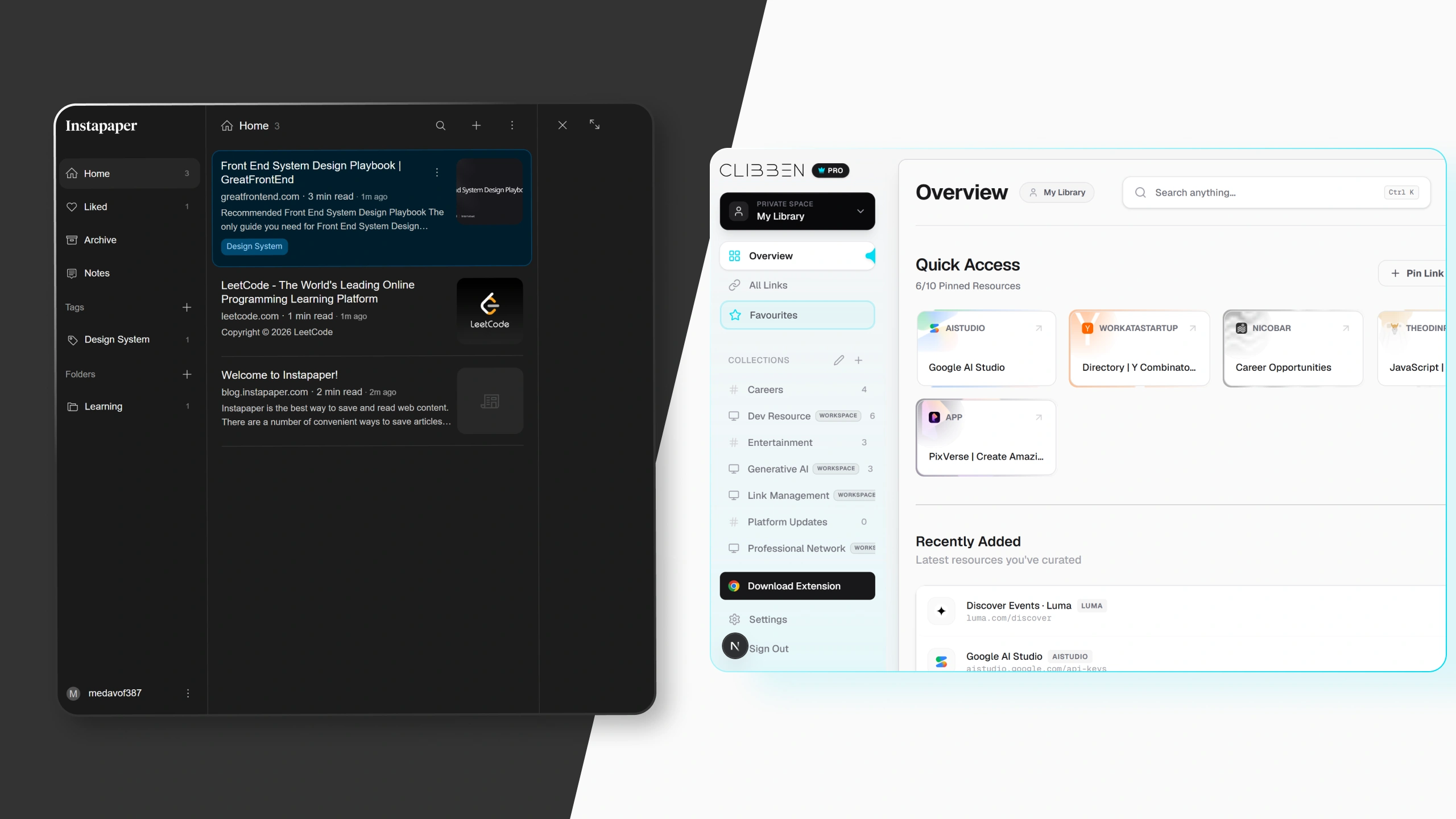
Instapaper has been doing one thing since 2008. It does it well.
Instapaper was created by Marco Arment in 2008, sold to Betaworks in 2013, briefly owned by Pinterest, and has been independently owned by Instant Paper, Inc. since 2018, run day to day by Brian Donohue. It is one of the oldest and most stable tools in the read-later category.
The core function: you save an article, Instapaper strips out the ads, sidebars, menus, and visual clutter, and presents just the text and images in a clean reading interface. It syncs saved content across iOS, Android, Kindle, and web, and allows users to access bookmarks without an internet connection. Since Pocket's shutdown, Kobo e-readers also added Instapaper support in August 2025, filling the gap Pocket left on that platform.
That long, stable history matters in a category where competitors keep shutting down - Pocket, its biggest rival, was discontinued by Mozilla in 2025. Instapaper is one of the last reliable read-later apps standing.
Unlimited article saves, 5 notes per month, folder organisation, and cross-device sync.
Full-text search across all saves, permanent article archive (so the page stays readable even if the URL goes down), PDF reader with unlimited notes, text-to-speech with AI voices, and unlimited notes.
Where Instapaper ends
Instapaper is a reading app, not a bookmark manager. Saving product pages, recipes, tools, or reference links feels wrong in a tool designed for long-form articles. Organisation is basic compared to dedicated bookmark managers.
Readers move off Instapaper when they want more than text: saving videos, PDFs, products or recipes in the same library, tag-based organisation instead of folders, and a faster pace of new features. Its development has slowed notably in recent years.
No retrieval from your current tab
Finding a saved link in Instapaper means opening the Instapaper app or website - a full context switch away from what you were working on. There is no overlay, no keyboard shortcut that searches your library from inside your browser.
No auto-categorisation
Every saved item goes into a queue or a manually chosen folder. If you do not organise things, they stack in the inbox indefinitely. For people who save frequently, the queue becomes unmanageable.
Narrow content type support
Instapaper is the top pick for read-it-later workflows - but it is a reading tool, not a visual bookmark manager. Everything is presented as a text list. If you are saving design inspiration, portfolio references, or anything where the visual appearance matters, Instapaper is not the right tool.
Side by side
| Feature | Instapaper | Clibben |
|---|---|---|
| Free tier | Unlimited saves, 5 notes/month | Full-featured |
| Paid pricing | $5.99/mo or $59.99/yr | $4.99/mo |
| Web app | Yes | Yes |
| Chrome extension | Yes | Yes |
| Firefox extension | Yes | No |
| Safari extension | Yes | No |
| iOS app | Yes | Not yet |
| Android app | Yes | Not yet |
| Offline access | Yes | No |
| Clean reading view | Core feature | No |
| Highlights and annotations | Unlimited on Premium | No |
| Text-to-speech | Premium | No |
| Kindle / Kobo integration | Yes | No |
| Save non-article links (repos, tools, docs) | Saves, but reading mode irrelevant | Works for any URL type |
| Auto-categorisation | Manual folders | Automatic on save |
| In-page search overlay | Separate app/tab required | Keyboard shortcut on any tab |
| Collections as Workspaces | No | Yes |
| AI Semantic Search | No | Pro plan |
| Team shared library | No | Pro plan |
| Full-text search | Premium only | AI Semantic (Pro) |
| Page archiving (link rot protection) | Premium | No |
| Import from browser bookmarks | Yes | Yes |
| Export your data | Yes | Yes |
| Independent ownership | Yes (since 2018) | Yes |
| Founded | 2008 | 2026 |
Instapaper's pricing was verified at instapaper.com/premium in May 2026. Features confirmed from published documentation. Clibben features current as of July 2026.
The honest answer to which one you need
Choose Instapaper if:
- •You primarily save long-form articles to read later
- •Reading experience matters - you want clean typography, no distractions
- •You own a Kindle or Kobo and want to read saved articles on e-ink
- •You annotate while reading - highlighting and notes are central to how you learn
- •You need offline access to saved content
- •Mobile is your primary reading environment
- •You save 5–20 articles a week and actually read them
Choose Clibben if:
- •You save a mix of links - articles, GitHub repos, documentation, tools, design references, YouTube videos
- •You need to find a saved link from whatever tab you are currently on - without switching to a different app
- •You want saving to be automatic - paste a link, Clibben files it without you deciding where
- •You do not have time to maintain a reading queue - you save things to retrieve, not to read in a dedicated environment
- •You work in a team and need shared resources everyone can search
- •You are a developer, researcher, or designer who accumulates dozens of links per session
These tools are not mutually exclusive
Instapaper and Clibben address different moments in how people handle links. Instapaper handles the “I want to read this properly later” use case - a deliberate reading queue for long-form content. Clibben handles the “I need to find that thing I saved” use case - fast retrieval from a general library across all link types.
If you read a lot of long-form articles and also save dozens of non-article links per session, the right setup might be both: Instapaper for your reading queue, Clibben for everything else. Both have free tiers. Both have Chrome extensions. They do not conflict.
Moving your Instapaper library to Clibben
If you are moving from Instapaper to Clibben - or adding Clibben alongside Instapaper - you can bring your existing saves across.
Export from Instapaper
In Instapaper, go to Settings → Export → Download .csv or HTML. Instapaper provides a CSV file of your saved items including URLs, titles, and timestamps.
Import into Clibben
In Clibben, go to Settings → Import. Upload the Instapaper export file. Clibben reads your saved items and creates collections from any folder structure you had in Instapaper.
Auto-categorisation takes over
Clibben reviews your imported links and can suggest or apply better groupings automatically. Your library is now searchable from any tab with your keyboard shortcut.
Start with Clibben's free tier
Save any link, find it from any tab. Import your existing bookmarks in two minutes. No credit card.